
Platform Guide
Learn how to create, customize, and 3D print your own miniatures — step by step
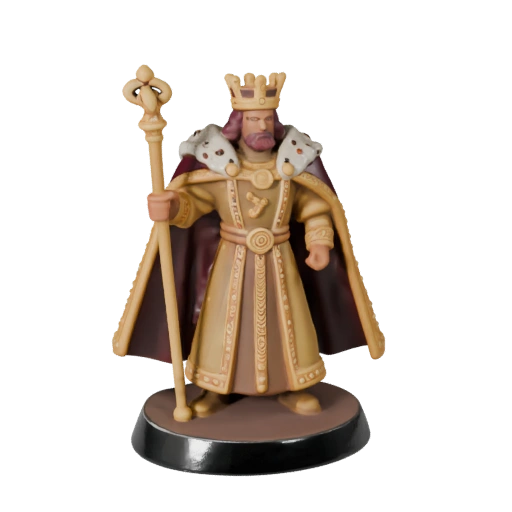
Ceremonial King — From AI Prompt to 3D Print
This royal figure was generated using AI text-to-3D, exported as STL in 28mm and 32mm scales for UV resin printing. Follow the steps below to create your own miniature from scratch or using AI generation.
How It Works
Open the Creator
Navigate to the Creator page and choose your starting point: select a species template (human, elf, orc, dwarf, and more) or start with AI text-to-3D generation by describing your character.
Customize Appearance
Fine-tune body proportions (height, build, shoulders), facial features, skin color, hair style and color, eye color. Each change is reflected in real-time in the 3D viewport.
Equip Gear & Weapons
Browse the equipment catalog and drag items into 8 equipment slots: head, torso, legs, feet, hands, back, right hand, left hand. Use the transform tools (W/E/R) to position, rotate, and scale each piece.
Choose a Pose
Select from combat, idle, magic, social, and action poses. The character smoothly transitions between poses. Adjust the camera angle to preview your miniature from every direction.
Export for 3D Printing
Export your creation as STL (universal), GLB (with materials), or 3MF (color printing). Choose your scale (28mm, 32mm, 54mm, 75mm) and download the print-ready file. Use our cost calculator to estimate printing costs.
AI Generation (Optional)
Describe any character or object in text and our AI generates a full 3D model. The Ceremonial King showcase was created this way — from a text prompt to a printable miniature in minutes.
Share in the Gallery
Make your creation public and share it with the community. Other users can view, like, comment, and remix your designs. Featured creations appear on the gallery homepage.
3D Viewport Controls
Rotate
Left-click and drag to orbit around your character. On mobile, use one finger to rotate.
Zoom
Scroll wheel to zoom in and out. On mobile, pinch with two fingers.
Pan
Right-click and drag to pan the camera. On mobile, use two fingers to drag.
Keyboard Shortcuts
Speed up your workflow with these shortcuts (creator page only)
| 1-9 | Quick-switch between panels (Species, Head, Body, Clothing...) |
| V | Orbit mode (view/select) |
| W | Move tool |
| E | Rotate tool |
| R | Scale tool |
| H | Reset camera to home position |
| G | Toggle grid overlay |
| B | Toggle base pedestal |
| Q | Cycle render quality (Low → Medium → High → Ultra) |
| F | Toggle fullscreen mode |
| Ctrl+Z | Undo / Redo (Ctrl+Shift+Z) |
| Ctrl+S | Save character |
Export Formats
STL
Universal 3D printing format. Supported by all slicers (Cura, PrusaSlicer, ChiTuBox). Geometry only, no color.
GLB
Binary glTF with embedded materials and textures. Ideal for digital viewing, AR/VR, and color 3D printers.
3MF
Modern print format with color and material data. Supports multi-material and full-color printing (Bambu, Prusa).